Stop chasing clients for documents.
Automatically retrieve statements, bills, and invoices from 3,951 institutions and deliver them to your cloud storage, organized by client.
Retrieves from 3,951 institutions, including:












Every month, the same fire drill.
-
Chasing clients for documents that never come.
-
2FA codes, password resets, locked accounts.
-
Missing statements that delay month-end close.
-
Manual downloads that don’t scale across clients.
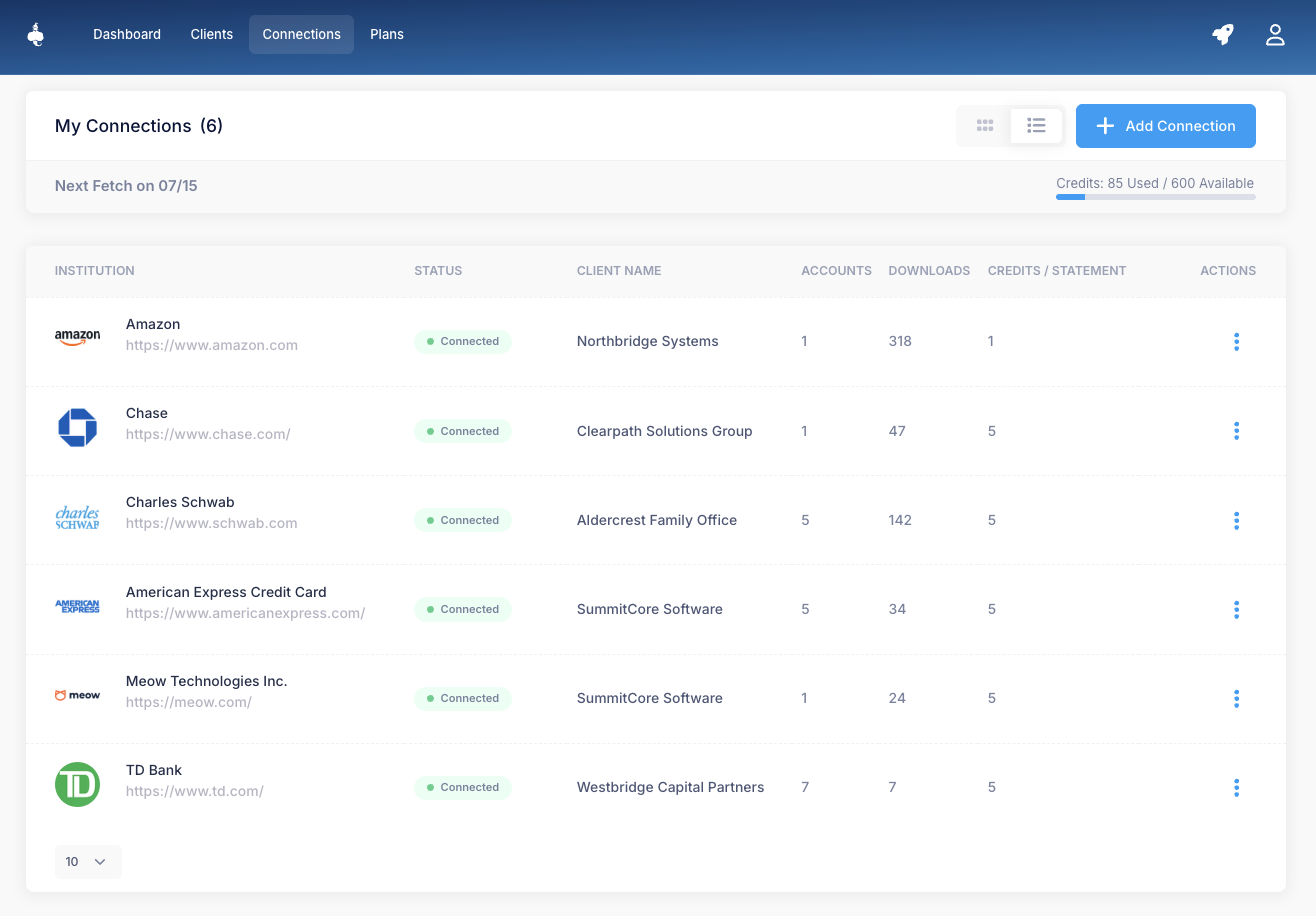
DocGenie automates document retrieval. Statements, bills, and invoices pull directly from 3,951 institutions on one-time client authorization, into your cloud storage, every month.
Three steps. One time. Then it runs.
- 01
Connect, or send a Client Connection Link
One-time setup. For accounts your firm holds, sign in once. For the rest, send a Client Connection Link. Your client authenticates with their bank on their own device. Retrieval starts on the next scheduled run.
- 02
We retrieve on schedule
Then we work. Bi-weekly on Core. Weekly on Professional. On-demand for any back-statement, across 3,951 institutions. No logins, no 2FA codes, no chasing. Every new statement lands in the storage you already use.
- 03
Files arrive in your storage
Files arrive. Named, dated, and folder-sorted by institution. Delivered straight to Dropbox, Drive, OneDrive, SharePoint, Box, or Evernote. By the time you open the folder, the close has already started.
What changes when DocGenie runs.
-
Statements land in the folder before you start work.
Set it up once. By the 1st (or as soon as the institution posts), every statement is in the client folder.
-
Your cell number stops being a 2FA hub.
Clients authorize through their own bank. You never see a password or a code.
-
Close starts on the 1st, not the 8th.
Every statement, every account, every month. Reconciliation begins on day one.
-
Add 50 more clients without adding more chasing.
Each client authorizes once. Retrieval runs the same for 5 clients or 500.
See what DocGenie delivers.
- DocGenie
- Acme Holdings LLC
- Chase
- Slate - ...6370
- Statement 2026-04-02.pdf
- Statement 2026-03-02.pdf
- Statement 2026-02-02.pdf
- Total Checking - ...8421 (4)
- American Express (8)
- Bank of America (8)
- Northwind Logistics (16)
- Coastal Property Group (12)
- Mariner Restaurant Group (9)
- Hilltop Construction (14)
3,951 institutions. Search to confirm yours.
Retail banks, business banks, brokerages, and credit card issuers. If your clients use it, search to see whether it’s covered.
Not listed? Request an institution. New institutions are added weekly based on customer requests.
Browse all institutions- Google Drive
- Dropbox
- OneDrive
- SharePoint
- Box
- Evernote
Security in plain English.
-
Two authentication modes. Both read-only.
Where an institution supports direct authorization, DocGenie receives a read-only token, never a password. Where it doesn’t, you provide the credential when you add the institution. It’s encrypted with AES-256-GCM under a key unique to your firm, scoped to document retrieval, and deleted the moment you revoke it. The mode is shown before you connect.
-
SOC 2 aligned.
Our security controls are aligned with SOC 2 Type II requirements. Formal certification is on the roadmap.
-
AES-256 at rest. TLS 1.3 in transit.
Encryption applies to documents, retrieval logs, and authorization tokens.
-
Read-only by design.
DocGenie cannot move money, change account settings, or access non-document data. The token’s scope stops at the institution.
Built for firms that handle other people’s documents.
For firms running monthly close across 25 to 200 clients.
-
Close starts on the 1st, not the 8th.
-
New client onboarding: one Client Connection Link, one authorization, historical statements pull on the first run.
-
Catch-up engagements: 18 months of statements across 8 institutions, in a single retrieval pass.
Free to start. No credit card. Connect your first institution in minutes.
For consumer bankruptcy and cooperative family law, plus estate, probate, and litigation support.
-
Consumer bankruptcy: 6 to 24 months of pre-filing statements across 10 to 15 accounts per case. Schedules backed by the institution’s actual statement, not a Plaid asset summary.
-
Family law (cooperative cases): financial discovery on the deadline you set, not the deadline your client’s calendar imposes.
-
Estate, probate, and litigation support: executors and personal representatives authorize once. Records arrive across every institution.
Free to start. No credit card. Connect your first institution in minutes.
For owner-operators and multi-entity entrepreneurs managing their own books.
-
Multi-entity ownership: each entity in its own folder, every month.
-
Send your accountant a Drive link instead of forwarding statements one at a time.
-
Tax season is a morning of review, not a weekend of downloads.
Free to start. No credit card. Connect your first institution in minutes.
Pricing that scales with your practice.
Free to start. Pay for what you retrieve. No seats, no minimums, no contracts.
- Free$0 forever2 connections
For trying DocGenie on a couple of accounts.
- Covers Amazon and Capital One
- Monthly retrieval
- Dropbox sync
- Core$15 /month15 connections
For solo bookkeepers and small firms with 5–15 clients.
- Bi-weekly retrieval
- Dropbox, Drive, Evernote
- Premium connections
-
Most popular
Professional$50 /month30 connections
For mid-market firms with 30+ clients or weekly close cadence.
- Weekly + on-demand retrieval
- Adds OneDrive
- Historical pulls
- Enterprise$300 /monthUnlimited
For bankruptcy departments, family-law firms, and multi-office practices.
- Adds Box and SharePoint
- Client management
- Client Connection Link
1 statement = 5 credits at most major US banks. Annual billing saves 20% on Core, Professional, and Enterprise.
See full pricing